Whoever notices at home that the milk has run out should be able to add it right then, and whoever is in the store should see what's missing. With Brauchma your family shares one shopping list that shows the same state on every phone. No ads, no tracking, free.
How to share the list
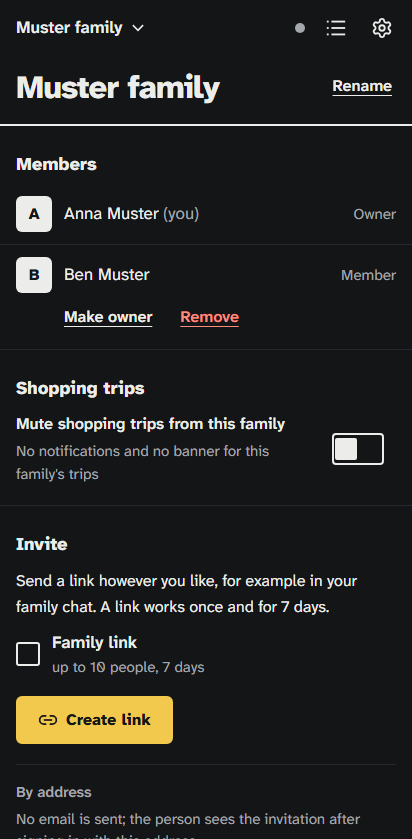
- In Brauchma, open the family page from the menu.
- Tap "Create link", then "Share" to send it through WhatsApp, Signal or any other messenger. Or tap "Copy".
- Whoever opens the link signs in with Google and taps "Join". From then on they see all of the family's lists.
A link works once and for 7 days. To invite several people at once, switch on "Family link" before you create it: then up to 10 people can join through the same link within 7 days. You can also enter an email address. The invitation then shows up in Brauchma as soon as that person signs in with this address, so let them know.
If someone without Brauchma shops for you, tap "Share list" in the list's menu: Brauchma sends the open items as text, grouped by category, through your phone's share menu, to WhatsApp for example, or copies the text where there is no share menu, and the last line names Brauchma with its link.
Everyone sees the same list, right away
When someone adds an item, it shows up on every phone in the family without a reload. When you check something off in the store, the family at home sees what's already in the cart. That way the butter doesn't come home twice.
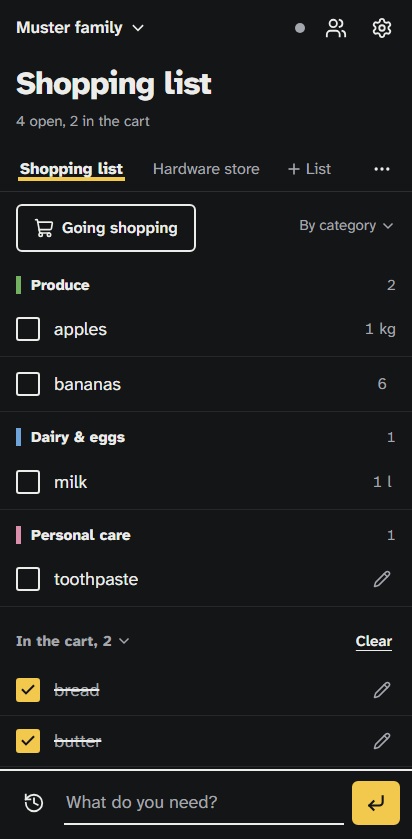
Write items the way you'd say them: "2 kg potatoes" becomes potatoes, 2 kg, under Produce. Brauchma puts each item into a category and sorts the list in the order you'd walk through a typical store. Suggestions come from what your family has bought before, and "Bought before" shows your regulars for the weekly shop.
Say so before you go shopping
Tap "Going shopping" above the list and choose now, in 15 or in 30 minutes. The others see a banner in the app right away, and those who turned notifications on get one on their phone. That leaves time to add what's missing, and you see how many items were added since you announced.
Notifications are off until each person turns them on in Settings. They never contain item names, and between 22:00 and 07:00 they stay silent unless you set other quiet hours. On an iPhone they need the app on the home screen and iOS 16.4 or later.
More than one list, more than one family
A family can keep up to five lists, say for the supermarket, the drugstore and the hardware store, and everyone in the family sees all of them. You can belong to up to ten families, for example your own and your parents', and switch between them in the header. A shopping list for flatmates works the same way.
Good to know
- Everyone in the family needs a Google account, because Brauchma only offers sign-in with Google. There is no separate Brauchma password.
- Brauchma is a web app. It runs in the browser and goes on your home screen with Chrome on Android and Safari on an iPhone; the home page shows the steps.
- The family's owner can rename it, remove members and pass ownership on. Every member can do everything else, including inviting people.
Brauchma is free and open to everyone. Open the app, sign in with Google and invite your family.
All the details about families, invitations and shopping trips are in How it works.