Only at the drinks shelf do you notice that the butter is still on the list, and the dairy fridge is three aisles back. A shopping list sorted the way you walk through your store gets you through the supermarket in one pass: what you reach first is at the top, what comes last is at the bottom. Brauchma sorts every list that way, by category and in the order you set.
By category, in your order
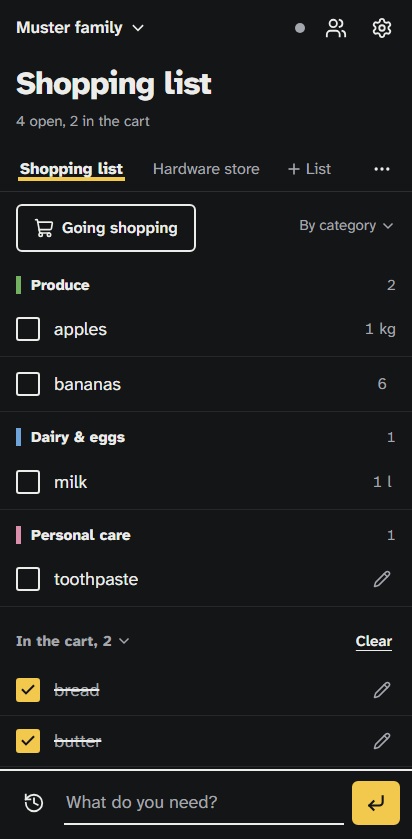
When you add an item, Brauchma puts it into one of 13 categories, such as Produce, Bakery or Dairy & eggs, and groups the list by them. Each list has its own order of these categories. At first it is that of a typical store, from Produce to Other.
Set the order once
Open "Category order" in the list's menu and put the categories into the order in which you walk through your store, by dragging them or with the up and down buttons. You do this once, and from then on the list follows that order. "Default order" brings back the order of a typical store.
The order applies to the whole family. A change reaches every phone right away, and whoever goes shopping sees the list in the same order.
If you shop at more than one store, give each one its own list. A family can keep up to five lists, and each keeps its own order.
Or let Brauchma learn it while you shop
The same menu has the switch "Learn the order while shopping". It is set for each list on its own and stays off until someone in the family turns it on.
While it is on, Brauchma notes in each shopping round the order in which you check off the first item in each category. A shopping round is everything checked off on the list without a break of more than 45 minutes. From three shopping rounds on, Brauchma orders the categories the way you check items off, and the menu shows when it last adjusted the order.
The two work together: set the order roughly once and turn learning on, and Brauchma adjusts it to the way you actually check items off. If you move the categories yourself later, learning starts over and needs three new shopping rounds. If you turn learning off, the order stays as it is. What Brauchma stores for this is in the privacy policy.
What the sorting can't do
- Brauchma sorts by category, not by the single shelves or aisles of a particular store. The items of one category stay together, even if your store keeps them in two places.
- Learning needs three shopping rounds, and a round only counts when items from at least two categories are checked off in it. A quick trip for milk teaches Brauchma no order.
- A category in which you checked something off in fewer than two shopping rounds keeps its place when Brauchma learns.
- The order applies while a list is sorted by category, not when it is sorted by time added.
Brauchma is free and open to everyone. Open the app, sign in with Google and invite your family.
All the details about lists and categories are in How it works.