In a shared flat you quickly end up with two packs of toilet paper in the bathroom and no milk in the fridge. With Brauchma your flat has one shared shopping list that shows the same state on every phone: whoever notices something is missing adds it, and whoever goes shopping sees it. No ads, no tracking, free.
Setting up your flat
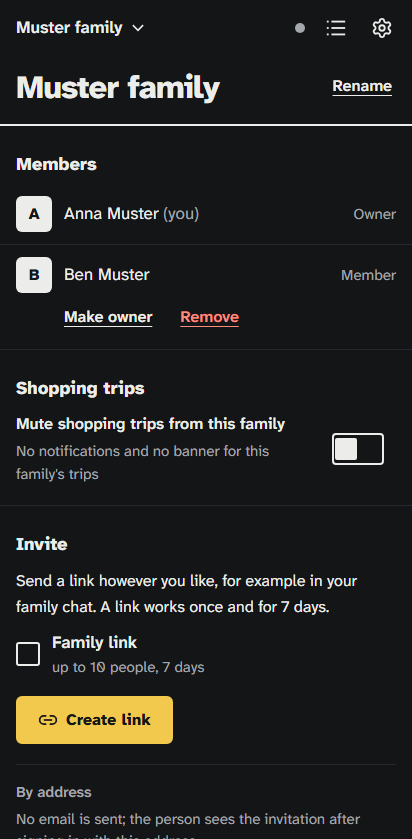
In Brauchma every group is called a "family", your flat included. On your first sign-in Brauchma creates a family named after your first name. For the flat, tap your family's name in the header, then "Create a family", and give it a name, for example "Sunny Lane flat". Then bring the others in:
- Open the family page from the menu and switch on "Family link".
- Tap "Create link" and share the link in your flat's group chat.
- Whoever opens the link signs in with Google and taps "Join".
Up to 10 people can join through one family link within 7 days. You can belong to up to ten families at once and switch between them in the header, so the list with your parents stays separate from the flat's.
Lists for everything you share
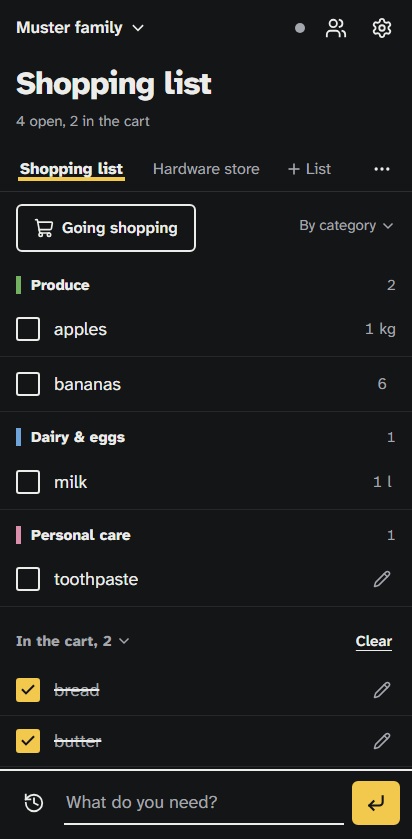
A flat can keep up to five lists, for example one for the weekly shop, one for cleaning supplies and toilet paper, and one for the next party. Everyone sees every list, and each change shows up on every phone right away.
Write items the way you'd say them: "6 pcs eggs" becomes eggs, 6 pieces. Brauchma puts each item into a category, in the order you'd walk through a typical store. "Bought before" shows what your flat buys most often, each item one tap away from the list.
Who's going shopping?
Tap "Going shopping" above the list and choose now, in 15 or in 30 minutes. The others see a banner in the app, and those who turned notifications on get one on their phone. That way anything missing can still go on the list before you reach the checkout.
To keep things calm, each member can announce a trip at most every 90 minutes. Notifications are off until each person turns them on, quiet hours apply at night, and anyone who'd rather not hear from the flat for a while switches on "Mute shopping trips from this family" on the family page.
When someone moves out
- Whoever moves out taps "Leave family" on the family page and no longer sees the flat's lists.
- The family's owner can remove members and rename the family. If the owner moves out, they make someone else the owner first.
- New flatmates join through a new link.
What Brauchma doesn't do
Brauchma is a shopping list, not a kitty: it doesn't split costs, doesn't work out who owes whom and has no cleaning rota. Everyone needs a Google account to sign in; there is no other way to sign in.
Brauchma is free and open to everyone. Open the app, sign in with Google and invite your family.
How sharing works in detail is in Share a shopping list with your family, and why Brauchma gets by without ads is in A shopping list without ads.